

 English


Bộ trình chiếu không dây VIA Connect PRO
Mô tả ngắn
Kramer VIA Connect PRO Wireless Presentation and Collaboration Solution
-
Login using conventional Wi–Fi or LAN connections
-
Supports Windows laptops and MAC, as well as iOS, Windows and Android mobile operating systems
-
Easy to use, simple and intuitive user interface
-
High quality video streaming, supports full HD 1080p/60 (using the VIA app Multimedia feature)
-
Up to four participant screens can be displayed simultaneously on main screen
-
Powerful security features: user authentication, 1024–bit encryption, dynamic room code
-
Audio — D

Hotline: 0918 642 886
VIA Connect PRO is a wireless collaboration and presentation solution that makes sharing and presenting in meetings easier. With any laptop or mobile device, users can view, edit and comment on documents in real time, share files and chat with individuals or multiple participants simultaneously. The solution can show up to four screens on the main display. From any laptop or mobile device, students, teachers or any in−room meeting participant can view the main display, edit documents together in real time, share any size file, turn the main display into a digital whiteboard, and more. The solution features iOS mirroring for MacBook, iPad, iPhone, Windows phone and Android mirroring (Lollipop OS 5.0 or newer).
VIA Connect PRO is ideal for huddle rooms, offering the best price−performance in the market.
- 60fps Streaming Multimedia — Share HD wireless video streaming (using the VIA app Multimedia feature).
- Wireless Connection for up to 254 Devices — Utilizing Compatible External Wireless Network.
- iOS and Android Mirroring.
- Wireless Device Connectivity — No dongle needed.
- DHCP Support.
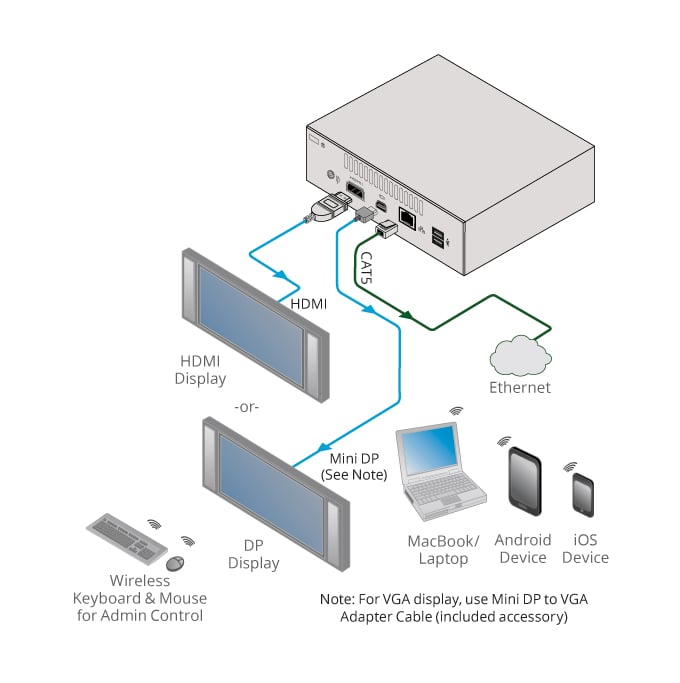
- Graphic Output Formats — Outputs to either an HDMI or Mini DisplayPort display. Note: Does not support graphic output to both the HDMI and Mini Display Port simultaneously.
- Cloud–Based File Sharing — Drag and drop files to the internal VIA cloud storage (32GB).
- Whiteboard Support.
- Control — Give a participant control over a presenter’s PC for true collaboration.
- Chat — Send an instant message to another user.
- iCloud Integration.
- Seamless Integration with VIA Site Management (VSM) Software & the VIA Pad
- Multilingual Support — Experience VIA in your language.
INPUTS
-
4 USB 3.0, 1 LAN on an RJ–45 connector
GRAPHIC OUTPUTS
-
1 HDMI, 1 mini DisplayPort
-
Note: Does not support graphic output to both the HDMI and Mini Display Port simultaneously
AUDIO OUTPUT
-
1 S/PDIF
PROCESSOR
-
4th generation Intel® Dual core 1.4GHz
MAIN MEMORY
-
4GB, high speed
STORAGE
-
32GB, solid–state drive
LAN
-
Gigabit LAN
AUDIO
-
Analog or embedded HDMI, S/PDIF Realtek ALC269
POWER SUPPLY
-
65W power adapter (19V, 3.4A)
INPUT VOLTAGE
-
100V~220V AC, 50/60Hz, auto sensing
INCLUDED ACCESSORIES
-
Power cord, Kramer mini DP to VGA adapter, VESA mounting bracket
PRODUCT DIMENSION
-
11.80cm x 11.50cm x 4.00cm (4.65" x 4.53" x 1.57" ) W, D, H
PRODUCT WEIGHT
-
2.2kg (4.7lbs) approx
Sản phẩm liên quan

Kramer VIA CONNECT3 Compact & Secure 4K Wireless Presentation and Collaboration Solution
Wireless content sharing and collaboration applications
Optimized for video conferencing using room peripherals “VIA Room Devices"
Dual WiFi for simultaneous Guest Access Point and Miracast connections
HDMI input enabling simultaneous wired and wireless presentation
4K HDMI output
Support for launching 3rd party web applications
Wireless sharing from Miracast™ and AirPlay™
Powerful security features with advanced encryption
Centralized cloud management with VSM Cloud

Kramer VIA GO3 Compact & Secure 4K Wireless Presentation Device
Connect using conventional Wi–Fi and/or LAN
Supports Windows™ and Mac™ laptops, Chromebooks™, iOS™ and Android™ mobile operating systems
Four participants can present simultaneously

Wireless content sharing and collaboration applications
Optimized for video conferencing using room peripherals
Local video streaming output to large displays
Direct run of 3rd party web applications
Wireless sharing from Miracast™ and AirPlay™
Powerful security features
Switched enabled wired input
Centralized cloud management and control

Conferencing & Wireless Screen Sharing Kit
Main platform hardware and touch panel controller
Pre–Installed Zoom Rooms®* application
Dual 4K display output
Powerful security features